
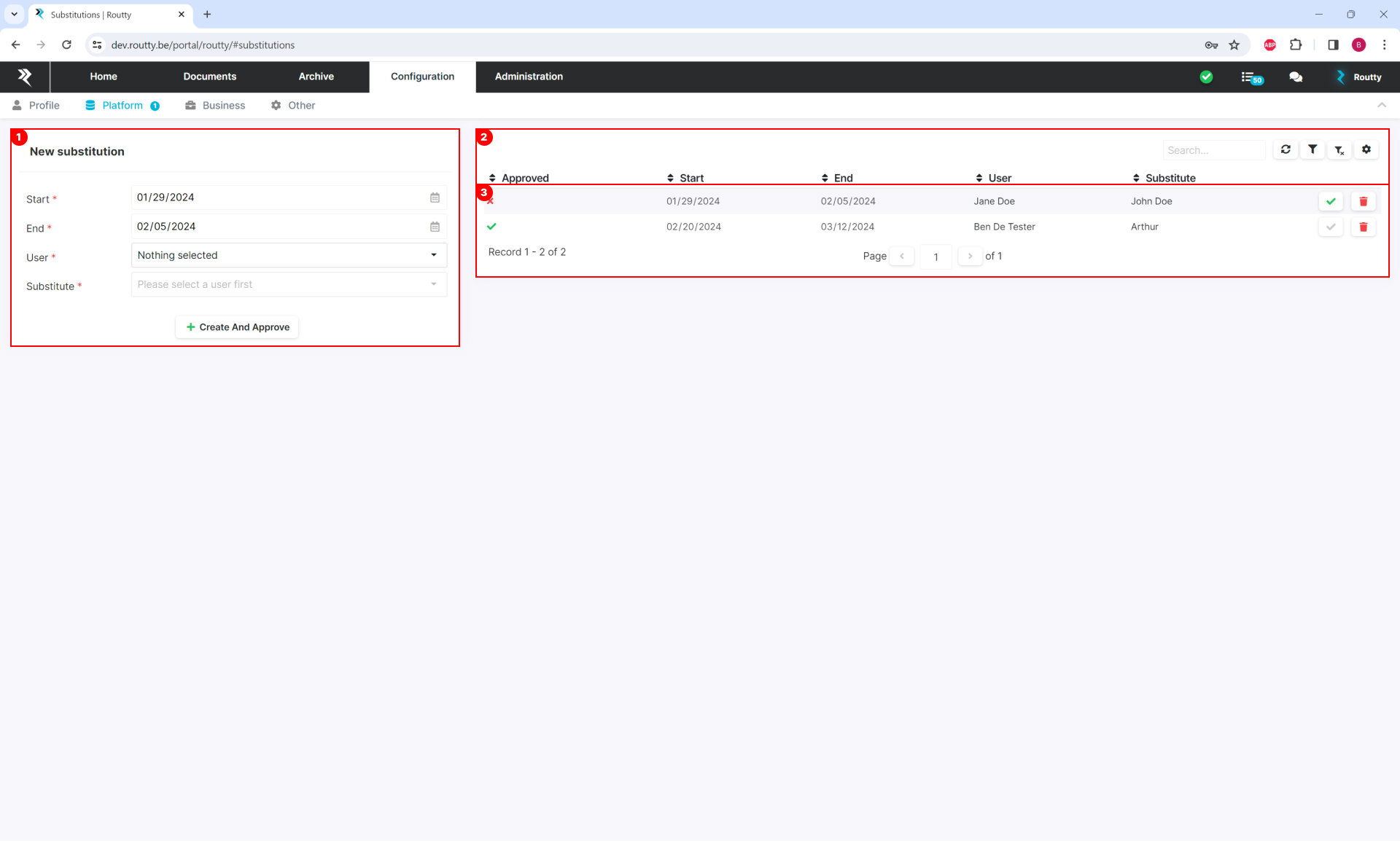
This page provides an interface to create and delete substitutions. Substitutions are used to hand over tasks on documents for a certain period of time to another user with at least the same workflow rights as you.
-
Create a new substitution
-
Start date The date when the substitution is applied
-
End date The date when the substitution is no longer valid
-
USER The person who hands over his tasks
-
Substitute The person who takes over the user’s tasks
-
-
The list where all the substitutions are displayed
-
Approved indicates if a substitution is valid or not
-
If not valid, an admin user has to take action by approving the substitution
-
-
Good to know
-
Users with admin rights can create substitutions between registered Routty users. This substitution is valid directly after creation.
-
Users with admin rights are able to delete any substitution.
-
A user with normal rights can only request a substitution that will take over his tasks. This substitution is valid when a user with admin rights gives their approval.
The admin user will get a notification in the to-do list on his dashboard when there are substitutions awaiting approval. -
Users with normal rights are able to delete their own substitutions.