
Roles

This page provides an interface to create, edit and delete roles. Roles can be used to give users access to specific screens and functionalities in Routty.
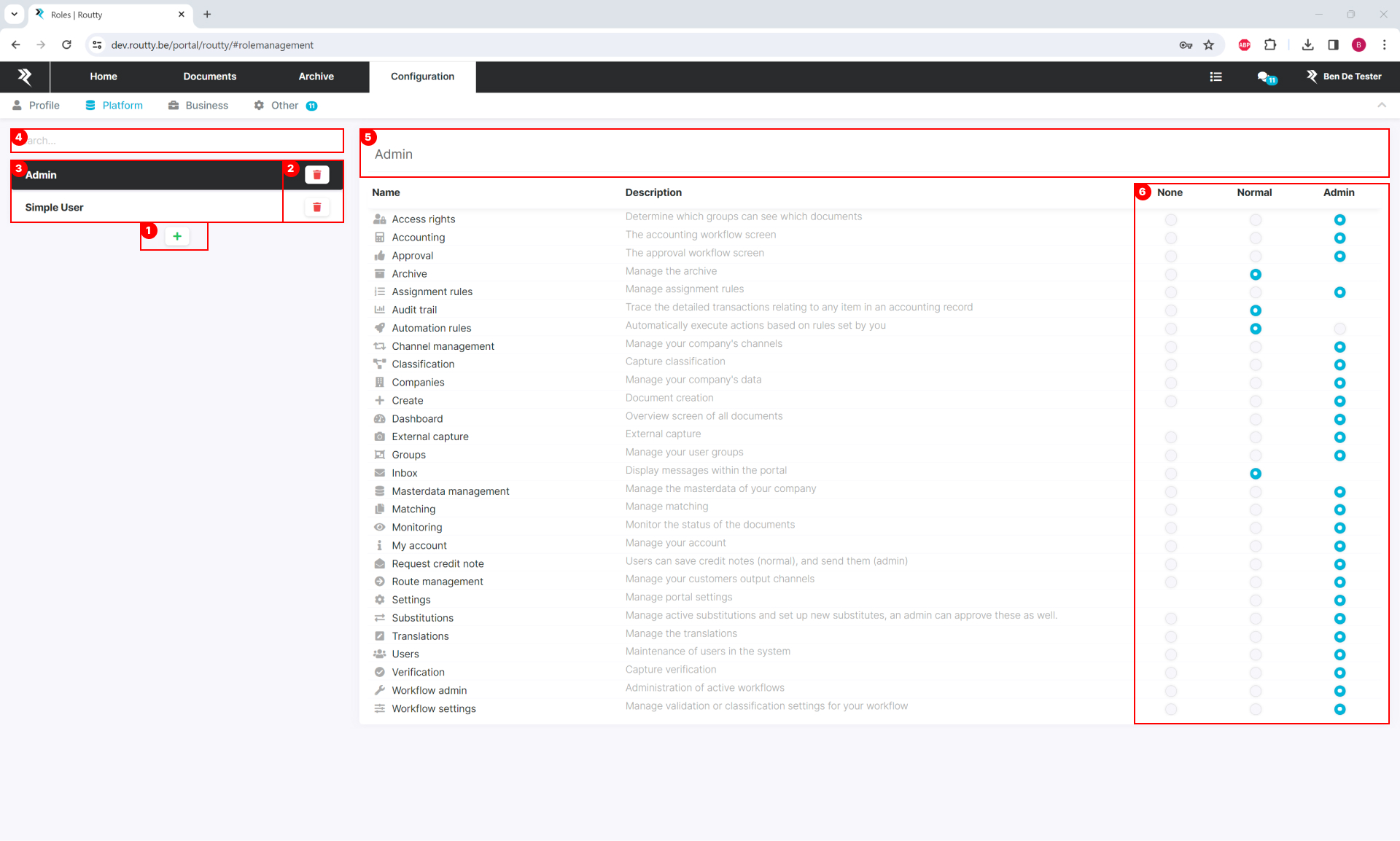
Role management_Routty-AP.jpg

The overview on the left side allows you to:

  1. add plus new roles

  2. delete existing roles

  3. select a role to edit its settings

  4. search for a specific role

In the editing area on the right side you can:

  1. edit the name of a role by clicking the name in the header

  2. select the level of permission a user with this role gets on different pages

For a detailed overview of the permissions, see the table below

Module permissions

Permission

Normal

Admin

Access rights

As a user with normal rights, I’m able to

  • Consult created access rights

  • Perform an access test

As a user with admin rights, I’m able to

  • Create/edit/delete access rights

  • Perform an access test

Archive

As a user with normal rights, I’m able to

  • Search documents on the archive

    • With standard search

    • With condition search

  • Consult document details

  • Consult/Open attachments

  • Consult/Open conversation on a document

  • Consult logs on a document

  • Consult logs of a document

/

Assignment rules

As a user with normal rights, I’m able to

  • Create/edit/delete assignment rules

As a user with admin rights, I’m able to

  • Create/edit/delete assignment rules

Audit trail

As a user with normal rights, I’m able to

  • Consult the audit trails

/

Automation rules

As a user with normal rights, I’m able to

  • Consult created automation rules

As a user with admin rights, I’m able to

  • Create/edit/delete automation rules

COA

/

/

Capture

As a user with normal rights, I’m able to

  • Log in on the capture module and verify documents

/

Channel management

/

/

Classification

/

/

Companies

As a user with normal rights, I’m able to

  • Consult created companies

As a user with admin rights, I’m able to

  • Create/edit/delete companies

Customer portal management

As a user with normal rights, I’m able to

  • Consult customer portal users

  • Consult customer portal roles

  • Consult customer portal access rights

  • Consult customer portal contact setting

As a user with admin rights, I’m able to

  • Create/edit/delete customer portal users

  • Reset/Set customer portal user’s password

  • Approve/Delete user requests

  • Create/edit/Delete customer portal roles

  • Edit customer portal access rights

  • Edit contact settings between customer portal and routty portal

Supplier portal management

As a user with normal rights, I’m able to

  • Consult supplier portal users

  • Consult supplier portal roles

  • Consult supplier portal access rights

  • Consult supplier portal contact setting

As a user with admin rights, I’m able to

  • Create/edit/delete supplier portal users

  • Reset/Set supplier portal user’s password

  • Approve/Delete user requests

  • Create/edit/Delete supplier portal roles

  • Edit supplier portal access rights

  • Edit contact settings between supplier portal and Routty portal

Company access (Cupo Supo)

As a user with normal rights logged in on the customer portal, I’m able to

  • Consult the company access rights

As a user with admin rights, logged in on the customer portal, I’m able to

  • Edit the company access rights

Dashboard

As a user with normal rights, I’m able to

  • Consult the dashboard

  • Set a filter and check the results

As a user with admin rights, I’m able to

  • Consult the dashboard

  • Set a filter

    • Check the results

    • Export a report of those results

  • Consult the status of the license

Exception handling

/

/

Group administration

As a user with normal rights, I’m able to

  • Consult the created groups

    • Open groups and consult the assigned users

As a user with admin rights, I’m able to

  • Create/Delete a group

  • Add/Delete users from a group

  • Change the group name

Inbox

As a user with normal rights, I’m able to

  • Consult the created groups

    • Open groups and consult the assigned users

/

Invoices

/

/

Master data management

As a user with normal rights, I’m able to

  • Consult master data

As a user with admin rights, I’m able to

  • Add/Edit/Delete master data

Monitoring

As a user with normal rights, I’m able to

  • Consult the monitoring data

  • Export monitoring data (PDF/CSV/XML)

  • Consult the logs of a document set

  • Consult/Open/Send a conversation in the conversation tab

  • Consult comments on a document

As a user with admin rights, I’m able to

  • Consult the monitoring data

  • Switch to advanced monitoring

  • Export monitoring data (PDF/CSV/XML)

  • Consult the logs of a document set

  • Consult/Open/Send a conversation in the conversation tab

  • Consult comments on a document

  • Add/Delete attachments on a document

  • Consult and edit the email tab (for OUT EMAIL documents)

  • Click on the actions button of an doc raw

My account

As a user with normal rights, I’m able to

  • Consult my account data

As a user with admin rights, I’m able to

  • Edit my account data

  • Reset my password

Route management

As a user with normal rights, I’m able to

  • Consult a route

As a user with admin rights, I’m able to

  • Delete a route

  • Edit a route

Role management

As a user with normal rights, I’m able to

  • Consult the created roles

    • Open roles and consult the permissions

As a user with admin rights, I’m able to

  • Create/Delete a role

  • Edit permissions

  • Change the role name

Sales order

/

/

Settings

As a user with normal rights, I’m able to

  • Change the language

  • Disable/Enable email notifications

  • Disable/Enable auto read for conversations

  • Disable/Enable auto detach PDF

  • Disable/Enable confirmation messages

  • Disable/Enable batch editing

/

Substitutions

As a user with normal rights, I’m able to

  • Request a substitution for myself

  • Delete my own substitutions

As a user with admin rights, I’m able to

  • Accept a requested substitution of a 'normal user'

  • Create/Delete any substitution

Translations

Only available for super users

Unit tests

/

/

Upload

As a user with normal rights, I’m able to

  • Upload an attachment (or other document type) in the archive

/

User administration

As a user with normal rights, I’m able to

  • Consult all the user data

As a user with admin rights, I’m able to

  • Edit any user data

    • Name

    • Username

    • Email

    • Role

  • Reset a password for a user

  • Create/Delete a user

Workflow permissions

Permission

Normal

Admin

Accounting

As a user with normal rights, I’m able to

  • Consult the document data in the workflow steps

As a user with admin rights, I’m able to

  • Accept/Reject/restart documents

  • Add/edit/delete document data

    • Lines

    • Coding lines

    • Intrastat lines

  • Edit document header data

  • Resolve validations

  • Select coding templates (if requested)

  • Add comment

  • Start a conversation

Approval

Matching

As a user with admin rights, I’m able to

  • perform manual matching actions

  • Perform the actions mentioned in the accounting permission

WFL admin

As a user with admin rights, I’m able to

  • change assignees of documents

  • Perform the actions mentioned in the accounting permission

Credit note request

As a user with normal rights, I’m able to

  • Request a credit note request on a document

As a user with admin rights, I’m able to

  • Send a credit note request on a document

  • Approve a credit note request requested by a normal user

    • If I’m part of the ‘mail approver group’

Workflow settings

As a user with normal rights, I’m able to

  • Consult the Workflow settings

    • Classification

    • Validations

    • Accounting

    • Matching

As a user with admin rights, I’m able to

  • Edit the Workflow settings

    • Classification

    • Validations

    • Accounting

    • Matching