
Instructions
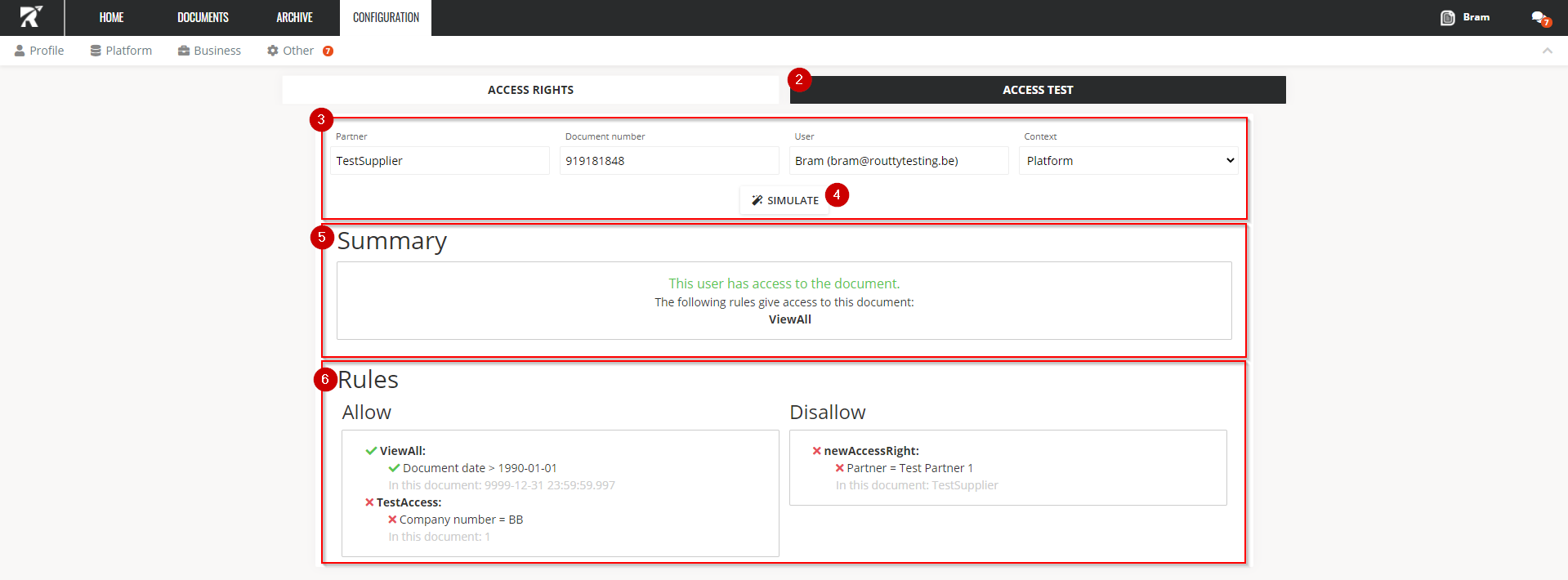
On the Access Test tab, you can check whether a user has access to a particular document on the platform or archive.
Ensure that you’re logged in with a user that has Admin/Normal rights on the access rights page
-
Navigate towards Configuration / Platform / Access Rights
-
Click on the Access Test tile
-
Fill in the following fields
-
Partner : Select the partner from the data source by clicking on the input field
-
Document number : Enter the document number for which you want to do an access check
-
USer : Select the user for whom you want to do the check
-
Context : Select Platform or Archive
-
Archive : Check if you have access to a document in the archive
-
Platform : Check if you have access to a document outside the archive
-
-
-
Click on Simulate
-
In the Summary you will be notified whether the user has access to the document or not
-
In the Rules section, all access rights to which the selected user has been added are shown
-
The ruleset granting access to this document is marked by a checkmark
-